Introducing Sympose
Muse Composer is now Sympose, a desktop music studio with an agent built in. Here is what changes for Composer and Max for Live users.
Muse Composer is now Sympose. It is still the same idea, an agent that works inside your music rather than handing you a finished track, but it has grown into a full desktop studio, and it gets a name of its own.
The name joins the Greek sym-, “together”, with the end of compose, and echoes symposium, a gathering for conversation. That is the idea behind the app: you and the agent composing in one project, with you as the author. The mark is two halves of an S around a shared space, one for each of you.
This post covers what Sympose is and what happens next if you use Composer or bought the Max for Live device.
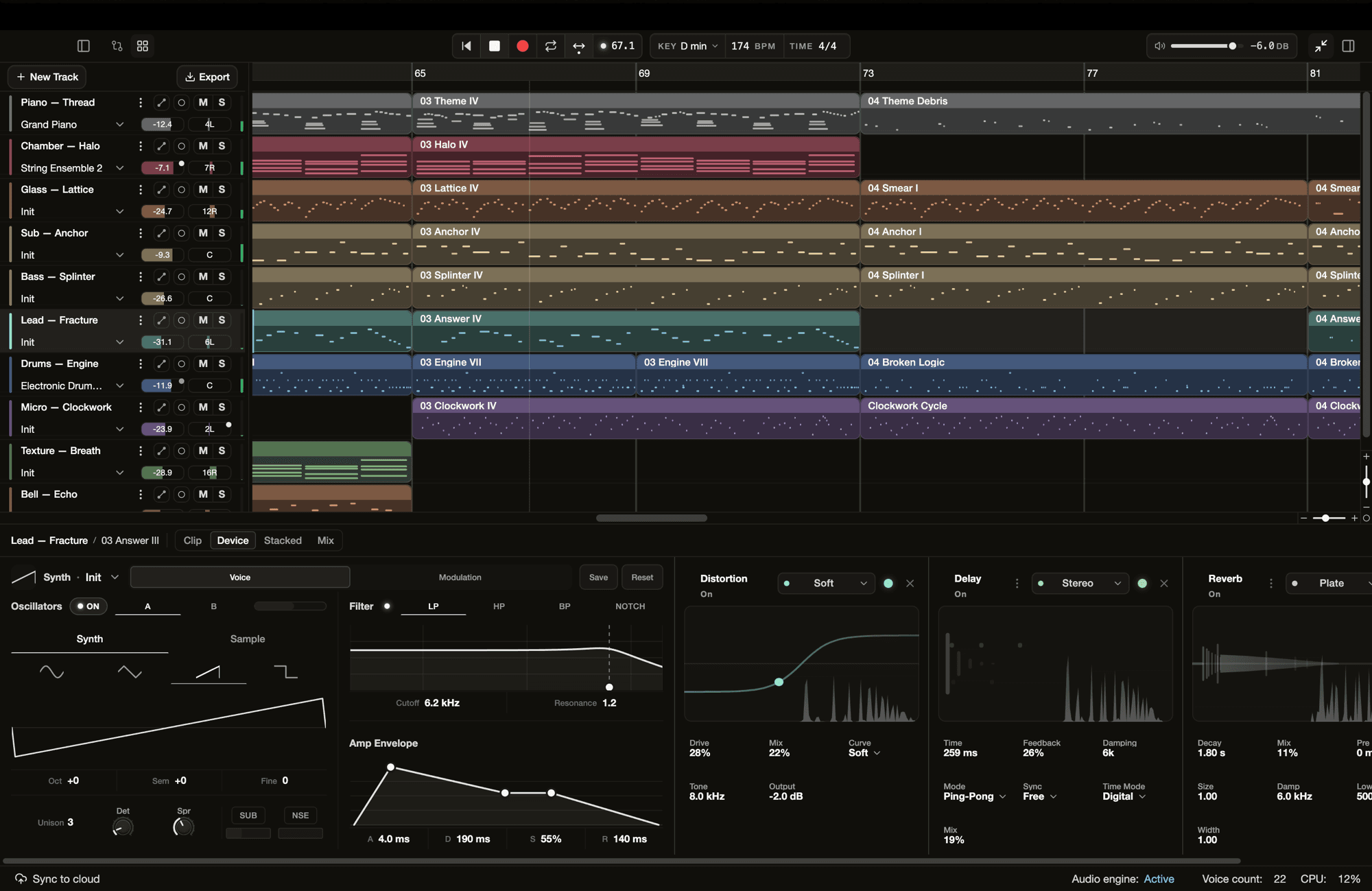
What Sympose is
Sympose is a desktop music studio for macOS and Windows with an agent built in. It has the parts you would expect from a DAW: an arrangement view, a piano roll, instruments and drum kits, a programmable synth, an effect rack, a mixer with sends, and MIDI and audio recording, all running on a native audio engine.
The agent works on the same project you do. Ask it for a counter-melody, a darker pad, or more room for the vocal, and it reads your tracks and makes that change, whether that means notes, a sound, an effect, or a level. You choose the model. Every edit lands on your tracks, where you can keep it, change it by hand, or undo it.
Projects live on your machine and keep working without a connection. Publish to the cloud when you want a backup or want to work across computers. When you are done, export MIDI to your DAW or render a mix and stems.
If you use Muse Composer
Download Sympose and sign in with the same account. Your account, subscription, and credits carry over, and your cloud projects appear in Sympose’s project list.
- Projects. Open any Composer project in Sympose and keep working. Once a project has been opened in Sympose, Composer can still show it but will no longer edit it, so the two apps never overwrite each other’s changes.
- Subscriptions. Nothing to do. If you are on the original $15 Pro plan, you keep that price and now receive the full Pro allowance of 300 credits a month.
- Composer itself. Composer keeps working for now and will point you to Sympose. When it retires, Sympose is where your projects open.
If you bought the Max for Live device
The Max for Live device was where this started, and I am grateful to everyone who bought it and told me what worked and what did not. It runs on the same servers as Composer, so it retires when Composer does. Until then it keeps working as it does today.
Plans
Every plan includes the full studio. The free plan comes with daily agent credits and standard models. Pro and Premium add monthly credits, frontier models, and the option to bring your own API keys. The details are on the pricing page.
What comes next
Thank you to the beta testers who spent the last months finding the rough edges in Sympose before anyone else had to. Sympose 1.0 is the starting point, not the finished studio, and it will keep changing based on what you make with it.
If you want the longer version of why I think an agent belongs inside the studio rather than in place of the musician, I wrote about it in Creative Machines. And if something in Sympose gets in your way, write to hi@sympose.studio. I read everything.