BassNotes +16 −16RevertRevertReverted
Sympose is your AI producer for writing MIDI worth keeping.
A desktop music studio with an AI agent built in. Write, arrange, and mix like you would in any DAW, or ask the agent to write a part, shape a sound, or balance the mix.
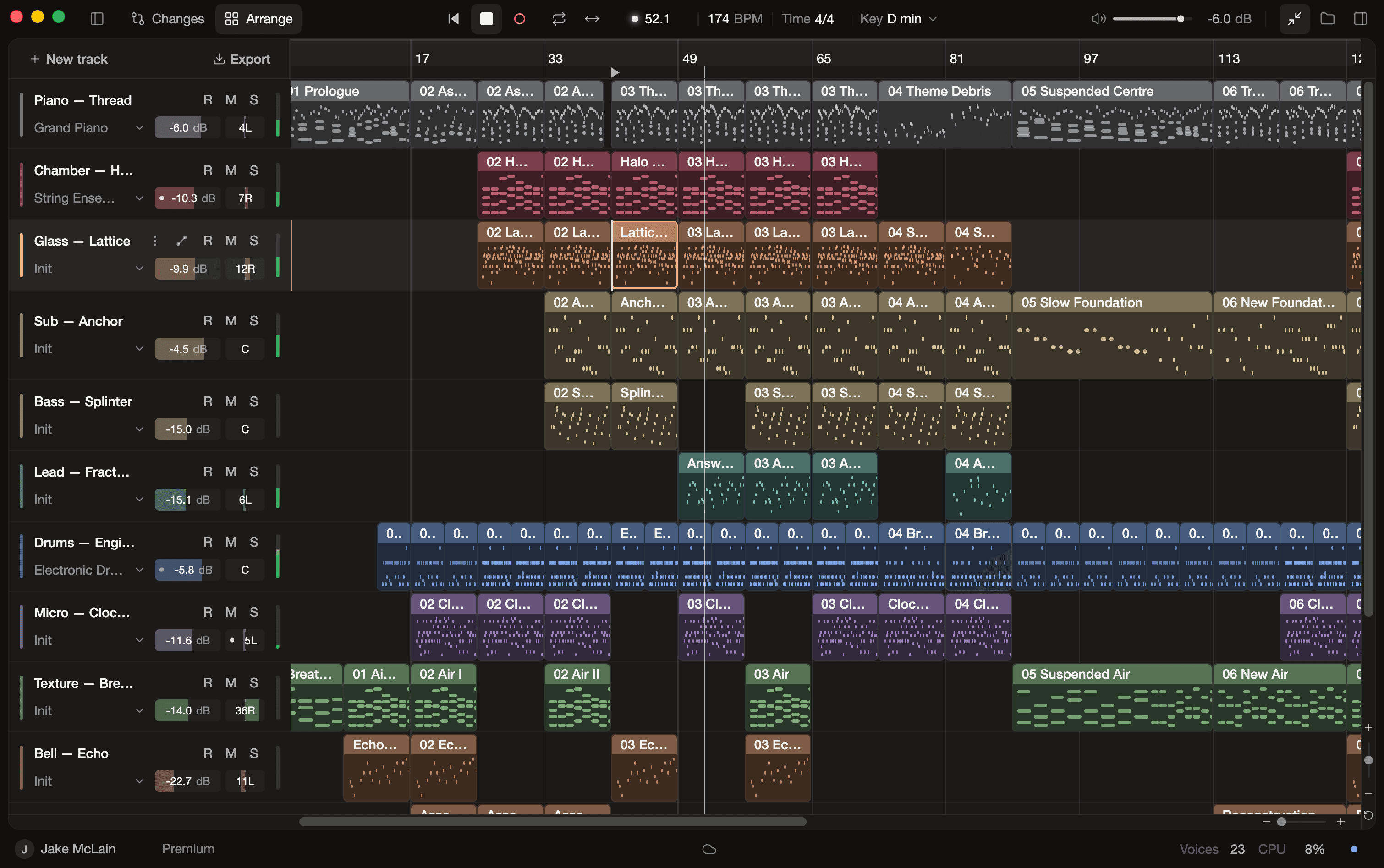
Arrangement, piano roll, instruments, synths, effects, and a mixer, all on a native audio engine. Record MIDI or audio, and change any note by hand.
A real studio
Arrangement, piano roll, instruments, synths, effects, and a mixer, all on a native audio engine. Record MIDI or audio, and change any note by hand.

An agent you direct
Ask for a counter-melody, a darker pad, or more room for the vocal. The agent reads your project and makes the change on your tracks, whether that's notes, sounds, effects, or levels, with the frontier model you pick.
Fits your workflow
Projects live on your machine. Start from a MIDI file, audio, or a recording, then export MIDI to your DAW or render a mix and stems.
Write and arrange
Generate parts that fit the harmony you already have, then shape every note, take, and clip yourself.
Advanced MIDI generation
A purpose-built harness gives the agent a structured view of your project and a notation made for writing music, so it writes parts that fit your tracks.
Spend more time on the fun stuff
Hand off the repetitive parts of arranging. Ask the agent to loop a pattern, repeat a section, or name and color your tracks.
MIDI and audio recording
Record from a MIDI controller, your computer keyboard, or an audio input, with count-in and record quantization built in. Takes are non-destructive.
Arrangement and audio editing
Move, split, and duplicate clips on a multitrack timeline. Trim and slip audio, and shape it with clip gain, fades, and equal-power crossfades.
A full piano roll
Edit pitch, timing, length, and velocity with scale highlighting and ghost notes from other tracks. Quantize, humanize, and duplicate by hand, or ask the agent.
Shape the sound
Design patches by hand or by describing them, and reach for instruments, kits, and samples without leaving the session.
Infinite sound design
Describe a sound and the agent generates a one-shot, from basses and leads to plucks, keys, and effects, then loads it into the synth as a playable sample.
Subtractive synth with AI patch design
Two oscillators, analog and sample engine, multimode filter, envelopes, LFOs, and a modulation matrix. Shape patches by hand, or let the agent surprise you.
Multisampled instruments and drum kits
Over 150 instruments, from multisampled pianos, strings, basses, and more, plus acoustic and electronic drum kits. Search, audition, and assign sounds from the instrument browser.
Samples and loops on demand
Ask for a riser, a texture, or a loop, and the agent adds it to an audio track as an ordinary clip. Loops are sized to your tempo and key.
Pro DSP effect rack
Compressor, plate reverb, delay, anti-aliased distortion, resonant filters, and more, each with its own visual language to inform your sound design.
Mix and deliver
Balance the session, review every agent change, and move MIDI and audio in and out of the rest of your workflow.
AI mix analysis
Ask the agent to check the mix, and it measures loudness, true peak, stereo width, and eight-band frequency balance on the master and every track, then makes targeted level changes.
MIDI and audio import
Start from a MIDI file, or from audio in WAV, AIFF, FLAC, MP3, or OGG. Each import lands on its own track as a clip you can trim, slip, and fade, while the source file stays untouched.
Review and undo every change
Each agent turn lands in Changes: the tracks it touched, with notes and settings before and after. Audition both versions, and only keep the changes you love.
Low-latency audio engine
Playback, monitoring, and export run on a native engine written in Rust to handle dense multitrack projects. Configure sample rate, buffer size, and more.
Export to your DAW
Drag MIDI straight into your DAW, render a stereo mix or per-track stems as WAV, FLAC, or MP3, or export a portable project bundle with everything it needs.
Local-first. Your music stays yours.
Offline editing
Your project lives on your machine and keeps working without a connection.
Your files
MIDI, presets, and exports are yours — for commercial use, no attribution needed.
Cloud sync
Publish to the cloud when you want backup and sync across machines.
Free to start. Upgrade when you need more.
Every plan includes the full Studio. Paid plans add monthly agent credits and frontier models.
Free
Try the full Studio
$0/month
- Full Studio on macOS and Windows
- Built-in instruments, effects, and mixer
- Daily agent credits
- Standard models
Pro
For regular sessions
$20/month
$16/month billed yearly
- 300 agent credits every month
- Frontier models
- Bring your own API keys (BYOK)
- Early access to new features
Premium
For heavier use
$60/month
$48/month billed yearly
- 1,000 agent credits every month
- Frontier models
- Bring your own API keys (BYOK)
- Early access to new features
Try Sympose Studio now
Free to download · macOS and Windows · Desktop only